Orbit Notes
Give your thoughts a place to orbit.
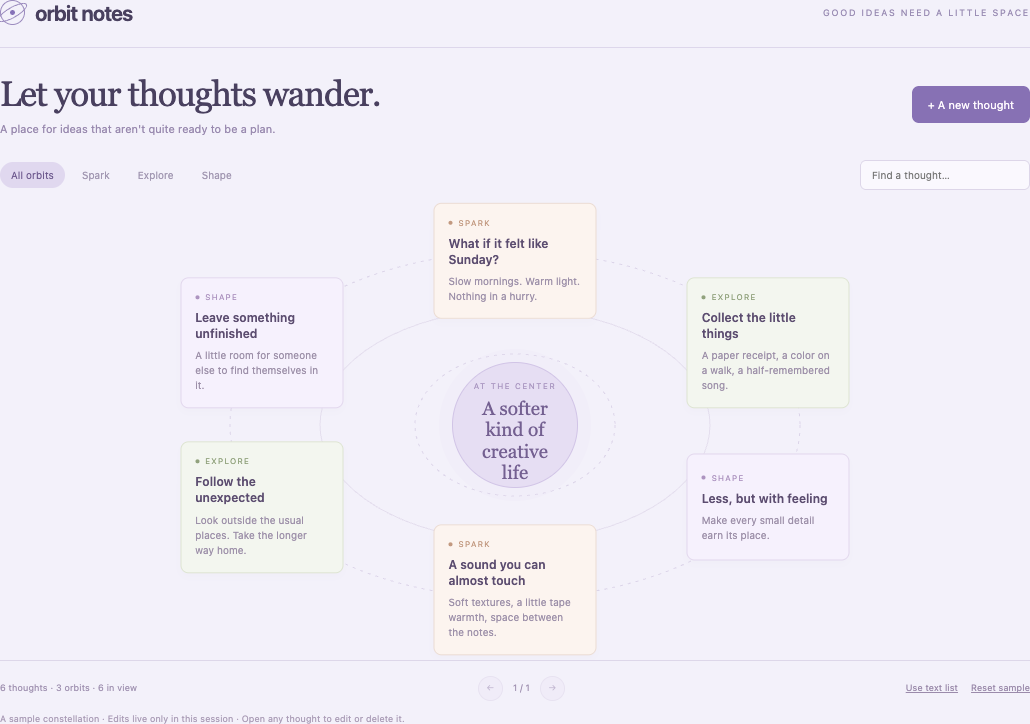
Build one standalone, dependency-free HTML file with inline CSS and JavaScript. It must work offline, without fetch, remote scripts, external fonts/assets, eval, or storage; use only session memory. Use system sans-serif and Georgia where specified. The result is a real working product demonstration: no placeholders, fake action buttons, or fake AI. Make it responsive to 320px with keyboard and touch controls, clear focus indicators, meaningful accessible names, and reduced-motion CSS. Use the attractive palette specified below; surrounding site chrome may grayscale the iframe.
It must work inside iframe sandbox='allow-scripts', including opaque origin, with this CSP exactly: default-src 'none'; script-src 'unsafe-inline'; style-src 'unsafe-inline'; img-src data:; connect-src 'none' Include that policy in a meta element. After all synchronous initialization, call window.parent.postMessage({type:'pls-demo-ready'}, '*'). Never assume allow-forms, allow-same-origin, persistent storage, or network access. Only perform audio after explicit user activation.
Create orbit-notes.html, a working notes app in a pale lavender palette (#f3f1fa) with plum text, violet actions (#8771b4), and peach/sage/lilac note groups. Use the lowercase wordmark “orbit notes” with a CSS orbit mark and headline “Let your thoughts wander.” Keep all notes explicitly described as a sample constellation with session-only edits.
Arrange editable note cards around an editable central topic on a 470px-high desktop board with three elliptical orbit outlines. Default topic: “A softer kind of creative life”. Show six notes per visual page at angles -90,-30,30,90,150,210 degrees, with radius 34% horizontally and 35% vertically; add working previous/next pagination when needed. Cards expose group, title, and a 75-character body preview. Seed six notes in this order: “What if it felt like Sunday?” (Spark), “Collect the little things” (Explore), “Less, but with feeling” (Shape), “A sound you can almost touch” (Spark), “Follow the unexpected” (Explore), “Leave something unfinished” (Shape), each with a short relevant creative thought.
Add thought opens an accessible modal. Notes have a required title up to 65 characters, optional body up to 600, and a Spark/Explore/Shape orbit. Save, Cancel, Delete and Escape dismissal must work. Clicking the central topic edits it in the same dialog, with note-body/group/deletion controls hidden. Provide search over title/body, All/Spark/Explore/Shape filters, computed total note/group/match counts, honest empty states, and Reset sample. A new note clears filtering and search and opens its final visual page. Render user text safely with textContent.
A Use text list control switches to a full editable text list of all matching notes, with full bodies. At 620px and below, automatically use a two-column text list and a prominent editable central-topic button; hide only the visual orbit/pager/view toggle. Include clear focus states and accessible editor labels.
Because allow-forms is absent, use explicit type=button Save handlers and reportValidity; intercept Enter in the title input to call the same save function. Never depend on a native form submit event.
Review the HTML you just built in the exact sandbox described above. Apply the sandbox form repair identified during planner testing: explicit type=button Save, reportValidity, and Enter handling in the title input. Confirm both note and topic editors work under allow-scripts only. Preserve all existing features. Test the updated behavior at 320px and desktop widths, including keyboard input. Return the complete corrected standalone HTML file.