Ripple Room
Move one light through a room and hear the reflections change.
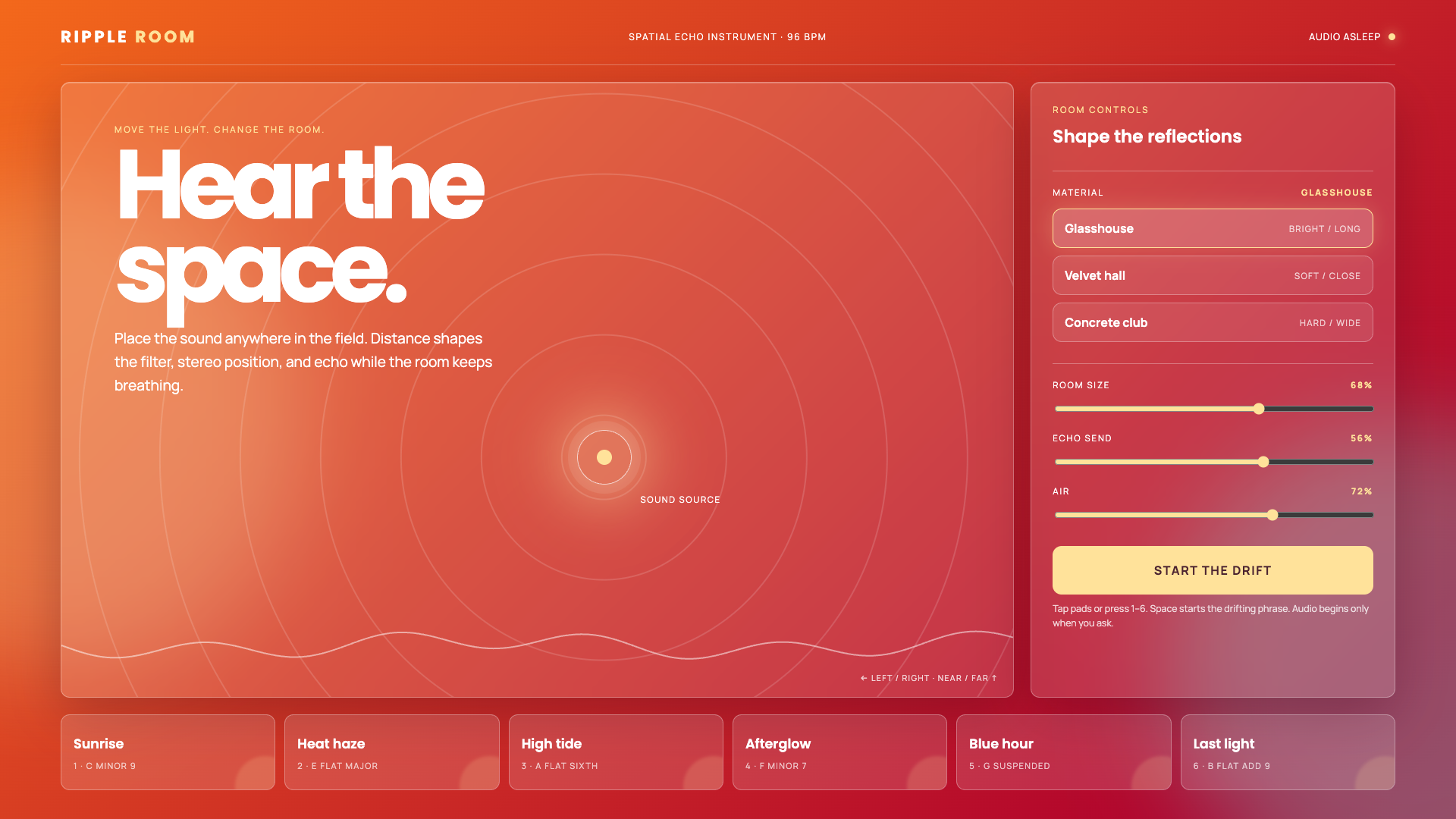
Build Ripple Room — a standalone spatial echo instrument in one dependency-free index.html with inline CSS and JavaScript. It must be a real working audio tool, not a landing page or mockup. It may load only Poppins and Manrope from Google Fonts; use no other external assets, scripts, packages, storage, fetch calls, or backend.
Use the Heatwave Festival design system completely: a shifting diagonal gradient from #FF7A18 to #AF002D to #319197, white text, #FFE29A highlights, translucent white glass panels, 12px corners, fine white borders, large blurred glows, and a slow 12-second background shift. Define every color on :root. Use Poppins for display type and Manrope for interface text. The gradient must remain visible through every panel.
The first screen is the instrument. Create a large interactive sound field on the left and a compact room-control rack on the right. The field headline is “Hear the space.” A glowing sound-source point follows click, drag, touch, and arrow-key input. Its horizontal position controls stereo pan. Its vertical position controls filter brightness and perceived distance. Show radiating rings from the source and a live oscilloscope trace along the bottom of the field.
Add three acoustic-material presets: Glasshouse (bright and long), Velvet hall (soft and close), and Concrete club (hard and wide). Add Room size, Echo send, and Air sliders with visible values. Changing material or controls must update the live audio graph immediately. Generate reverb impulse data procedurally; do not use audio files.
Add six playable chord pads named Sunrise, Heat haze, High tide, Afterglow, Blue hour, and Last light. Each pad triggers a four-voice synthesized chord with short attack, long fade, subtle detuning, stereo position, filtering, delay feedback, and convolution reverb. Number keys 1–6 trigger the matching pads. Provide a Start the drift button that plays a repeating eight-chord phrase at 96 BPM; Space toggles it. Stop the phrase when the page becomes hidden.
Create or resume AudioContext only after an explicit user action. Show honest “audio asleep” and “audio awake” state. If Web Audio is unavailable, report that clearly instead of faking playback. Do not request microphone access. Keep levels conservative and stop or release every oscillator.
Make the demo usable at 320px without horizontal scrolling. Stack the rack below the field on tablet widths and arrange pads in two columns on phones. Keep all controls keyboard accessible, give the sound field an accessible name and arrow-key instructions, expose material selection with aria-pressed, use a polite live region for changes, show clear focus rings, and honor prefers-reduced-motion.
Use this CSP in a meta element: default-src 'none'; script-src 'unsafe-inline'; style-src 'unsafe-inline' https://fonts.googleapis.com; font-src https://fonts.gstatic.com; img-src data:; connect-src 'none'. After synchronous initialization, call window.parent.postMessage({type:'pls-demo-ready'}, '*').